

Advanced Collections: A “Non-Standard”
BI Publisher Implementation

Variations from The Standard

There are a number of applications within Oracle EBS that have deviated from utilizing the standard BI Publisher EBS integration.  These applications are not misguided in their implementation, they just utilize BI Publisher differently for their own needs.  Here we will discuss one such deviation, Advanced Collections, in an effort to assist others in the setup and the use of BI Publisher.

Advanced Collections

Prior to 11.5.10 patch 11iEX.H rollup 4, the One-To-One Fulfillment server was used to deliver collections-related correspondence to customers.  Commencing with 11.5.10 patch 11iEX.H rollup 4 and continuing into R12, the Oracle One-To-One Fulfillment server has been phased out in favor of BI Publisher.

Layout Templates and XML Data

Layout Templates for Advanced Collections are managed with standard XML Publisher Administrator functionality, however XML data is not generated with Oracle Reports or Data Templates.  XML generation is done with individual queries that are setup in Advanced Collections and then associated with a template.  To add or edit a seeded query, as Collections Administrator, navigate to Administration->Manage Templates Query.  This form will allow you to query and then add new queries to be associated with a template.
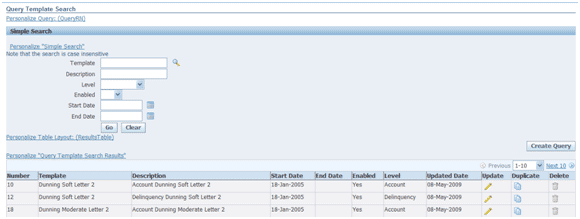
 Manage Templates Query - Advanced Collections
Figure 23: Manage Templates Query

Update Query Template - Advanced Collections
Figure 24: Update Query Template

To associate a Collections Document type with a template/query pair, as Collections Administrator, navigate to Setup Checklist->Set Up Correspondence->Confirmation Letter Template.  This screen sets the template that will be used when generating the specific document type.
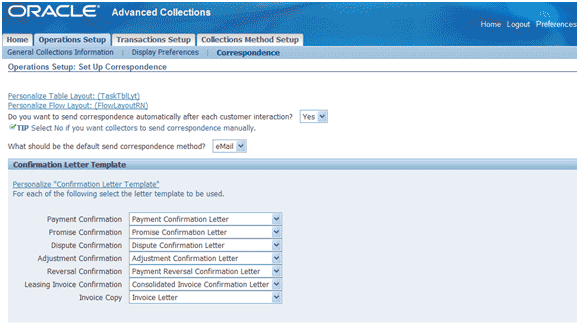
Assign Template to Document Type - Advanced Collections
Figure 25: Assign Template to Document Type

Because Advanced Collections does not utilize Data Templates or Oracle Reports to generate XML, a dummy Data Definition is seeded with the product for all Collections Templates as a Data Definition is a required field when adding a new template.
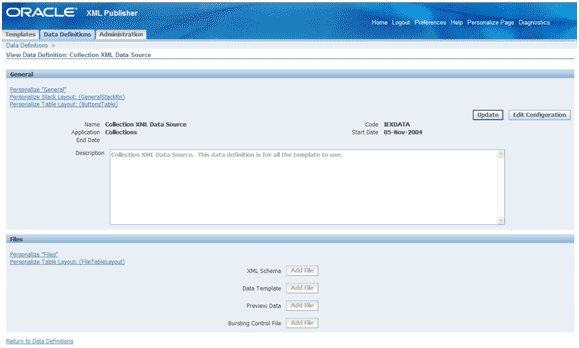
Data Definition - Advanced Collections
Figure 26: Collections Data Definition

Generation of Final Output and Delivery

Collection notices in general are meant to be delivered, either by printing and stuffing into an envelope or by email or fax.  This delivery is accomplished in Advanced Collections using the Collections form (logged in as the Collections Agent responsibility).  Query the collections information by customer or contact name and then navigate to the Transaction tab.
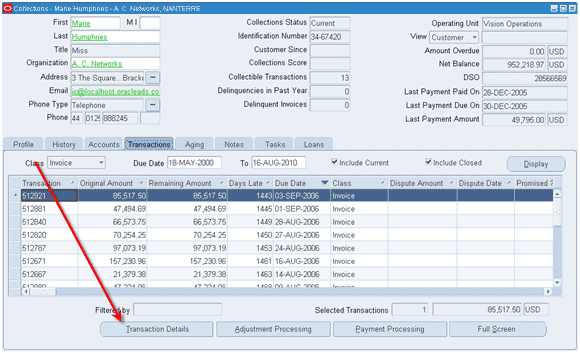
Transaction Details - Advanced Collections
Figure 27: Collections -> Transaction Details

Click on the Transaction Detail button and a new screen will be invoked that has a ‘Send Copy’ button included.
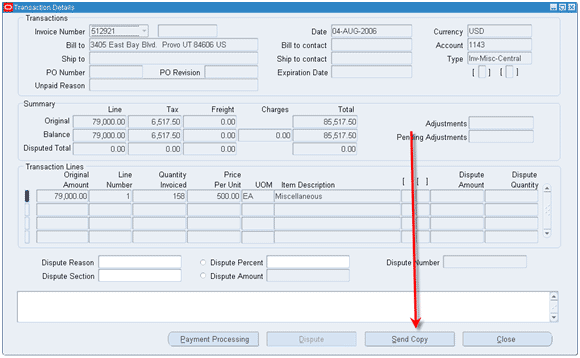
Send Copy Button - Advanced Collections
Figure 28: Collections -> Send Copy Button

Depending on configuration the following form that allows for the entry of a print, fax and email destination will be displayed and the user can address the document.
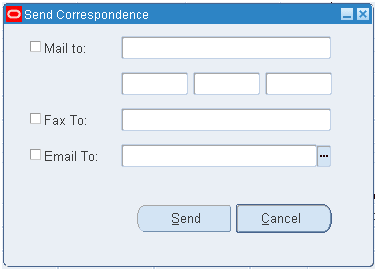
 Send Copy Form - Advanced Collections
Figure 29: Send Copy Form

Upon clicking Send, a Java based concurrent program is run to execute the appropriate query for the document type to generate the XML and then apply the layout template associated with the query.  This process bypasses the normal XML generation and Layout Template application processes of the standard BI Publisher integration.

In order to deliver the documents to the user defined recipients, the BI Publisher Delivery Manager is invoked by the aforementioned Java program.  The delivery server parameters are determined in one of two ways.

The first and most straightforward method is via the definition Collections Administrator -> Setup Checklist -> Correspondence page where there is a form to fill in the Email Host, Email From Address, Fax Host and Printer and Printing information.

Delivery Options - Advanced Collections
Figure 30: Delivery Options

 These configuration options can also be set using the profile options:

  • IEX: Fax IPP  Host
  • IEX: Fax IPP Port
  • IEX: Fax IPP printer name
  • IEX: SMTP Host
  • IEX: SMTP From
  • IEX: Default Fulfillment Subject
  • IEX: Print IPP Port
  • IEX: Print IPP Host
  • IEX: IPP Printer name

The second method allows for the use of the xdodelivery.cfg file.  Regardless of the values set in the configuration mentioned above, if this file exists in $XDO_TOP/resource/ it will be used to determine how to deliver the Collections Correspondence.  This is an important note as you may not realize that the file is out there and being used for another application.  Use of this file requires the following by delivery channel:

Email – The server name MUST be “mysmtp1”
Print – The server name must be the value specified in the profile value IEX: IPP Printer name
Fax – The server name must be the value specified in the profile value IEX: Fax IPP Printer name

Delivery Status

Advanced Collections with patch 8435600 allows for the update of fax status within Collections.  After delivering a fax via Advanced Collections, the document goes into an ‘Open’ state and prior to this patch had no way to get out of this state.  This obviously causes confusion for users as the final outcome of the document is never reported on.
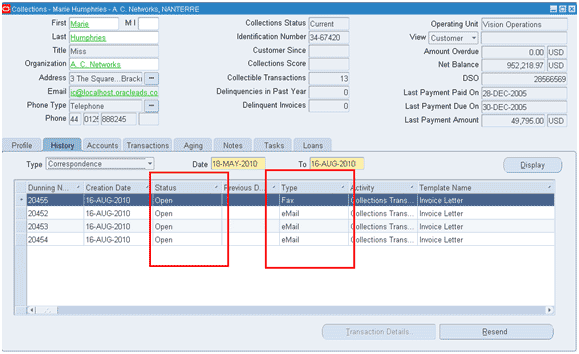
Status of Delivery - Advanced Collections
Figure 31: Collections Status of Delivery

With this patch the status can be updated to display the status that the IPP client has for the job.  It is important to be clear about what the status really means.  If you are using the standard IPP functionality, it will only be the status of the ‘print job’, indicating whether or not CUPS was able to print the document to the fax printer.  This status is not the final status of the fax job, therefore it does not indicate whether or not the fax was successfully delivered to its final destination.

For more information:

See What AventX Can Do for Your ERP

Automate how your Oracle, JD Edwards, or SAP system emails, faxes, prints, and tracks business documents. Reach out and we’ll show you how it works with your setup.

Rollup of Product Updates: v26.3

AventX 26.3 tracks every document from Oracle EBS, Oracle Cloud, and SAP in one place, with one delivery per customer and offline-ready AventX Mobile.

German E-Invoicing Starts January 1: What JD Edwards Teams Need to Do Now

JD Edwards can already produce your invoice and its structured data. Germany’s mandate needs them as one file. Here’s how to close that gap before the deadline.

Rollup of Product Updates: v26.1 & v26.2

Edit the Oracle EBS printer registry safely…no DBA access required. Automated, audited document delivery configuration for Oracle EBS teams.

AventX—Built on 40 Years. Designed for What’s Next.

For the past forty years, we've been working on a big business challenge. Document Delivery. In that time, STR Software has helped Oracle EBS, Oracle eAM, JD Edwards, SAP, and many more teams get the right documents to the right place—reliably, accurately, and on...

Stop the Administrative Shuffle: Closing the Gap Between Oracle EBS Contracts and Docusign

Discover how AventX integrates Oracle EBS Contracts with Docusign to automate attachment gathering, field placement, and link-back archiving.

How Oracle EBS Organizations Secure SharePoint Access While Moving Attachments Out of the Database

Oracle EBS teams need to move attachments to SharePoint without losing control over access. This use case shows how organizations align Oracle EBS user logic with Entra ID group governance to improve security, performance, and audit readiness.

Rollup of Product Updates [Fall, v25.4]

Improve security oversight, accelerate enterprise printing, and expand API driven integrations across Oracle EBS and eAM.

What’s New in AventX Mobile for Oracle eAM v25.3

Discover what’s new in AventX Mobile for Oracle eAM v25.3. Android support, offline enhancements, compliance controls, and faster mobile work order execution for enterprise maintenance teams.

STR Software at Quest’s Oracle Cloud Summit – Virtual!

We’re excited to announce that STR Software will be presenting at the upcoming Oracle Cloud Summit – Virtual!, hosted by Quest Oracle Community—a value-packed event delivering practical, how-to learning for Oracle Cloud Applications users. If your team is looking for...

Rollup of Product Updates [Summer 2025; v25.3]

AventX 25.3.x boosts enterprise document delivery with smarter email validation, expanded JD Edwards + Oracle compatibility, and powerful new eAM mobile and EBS API features to streamline workflows from the server room to the shop floor.

Printing Without Pain: How AventX Simplifies EBS Print Setup in OCI

When Oracle EBS moves to Oracle Cloud Infrastructure (OCI), printing becomes one of the most painful challenges. Here’s how AventX solves it.

Rollup of Product Updates [Spring 2025; v25.2]

Streamline your Oracle workflow with AventX. Get dynamic stamping, automated scheduling, and granular migration control for maximum efficiency.

Don’t Miss STR Software at Ascend 2025!

Discover how to conquer document delivery chaos in your Oracle Cloud environment at Booth #425 and learn invaluable strategies in our “How to Train Your Dragon” speaking session. Plus, a fiery giveaway awaits!

Global Steel Producer Achieves Dramatic Oracle Database Reduction through AventX A2A Attachment Migration

AventX A2A Migrates Attachments to SharePoint, Saving Hundreds of GBs and Improving Performance.

Share This