
Is Your Mobile Maintenance Strategy OSHA Compliant?

3 Reasons Your Mobile Maintenance Initiative May Not Be OSHA Compliant, and What You Can Do to Correct It

First and foremost, let’s be clear, OSHA—the Occupational Safety and Health Administration—doesn’t have current regulations directly addressing the use of mobile devices as a tool in the workplace.

But that doesn’t mean there are not potential pitfalls with your current iOS, Android, or other mobile device and applications.

OSHA exists to “ensure safe and healthful working conditions for working men and women by setting and enforcing standards and by providing training, outreach, education and assistance.”

Maintenance teams are no exception. Maintenance technicians and professionals are among a large group of employees who work in exceptionally dangerous conditions daily.


Safety and Health Program Recommended Best Practices

Under its mission to protect workers, OSHA has published a series of Safety and Health Program Best Practices. This document covers a full 36 pages of information, but can be summarized into the following seven (7) core focus areas:

(The complete guidelines can be reviewed here. A separate Best Practices for Construction is also available.)

1. Management Leadership – Organizations need buy-in from the top to put safety and continuous improvement at the forefront of all they do.

2. Worker Participation – Workers should be involved in creating, maintaining, and actively participating in a safety and health program. Any barriers or impediments to participation should be removed.

3. Hazard Identification & Assessment – Procedures and protocols should be established to identify and correct hazards and risks to employee safety. Routine inspections should take place, and any safety incidents should be investigated to determine the root cause.

4. Hazard Prevention & Control – Employers and workers cooperate to eliminate, prevent, or control workplace hazards. Plans to implement controls, monitor progress, and evaluate their efficacy should be developed.

5. Education & Training – All workers are trained on the program, their responsibilities, and how to identify workplace hazards. Employers, managers, and supervisors should all understand their responsibility for protecting workers’ rights and how to respond to reports and concerns.

6. Program Evaluation & Improvement – Safety programs should be continually evaluated and improved where needed.

7. Communication & Coordination for Host Employers, Contractors, and Staffing Agencies – All employees should be provided the same level of safety and communication regarding any hazards. Host employers should establish standards for contractors and staffing agencies.

With these core focus areas in mind, most organizations develop a robust written Safety and Health Program that will allow them to meet all the regulations and recommendations provided by OSHA.

OSHA even provides a helpful Safety and Health Program Audit Tool to ensure your organization’s plan will be successful and identify any deficiencies or areas of improvement.

So, How Does All This Impact My Mobile Maintenance Operation?

Well, to answer that, ask yourself this:  

Does your mobile maintenance application allow you to successfully execute on OSHA’s Best Practices and your organization’s established Safety and Health Program?

If you answered with an affirmative “Yep,” then you are probably in the clear! Good to go!

If you answered “No” or, better yet, “I have no idea what the heck you are talking about,” read on.

Three Reasons Your Mobile Maintenance Application May Not Support Your OSHA Initiatives

Reason #1: It Doesn’t Provide Your Technicians All the Information

Mobile maintenance apps are on the rise for a lot of reasons. They can eliminate burdensome paperwork and can support organization-wide paperless and green initiatives. They can free maintenance technicians from a desk…or rather, the need for a desktop application. They can provide better collaboration, more efficient processes, reduce errors, and much more.

We even threw our hat into the ring, developing a unique mobile application for Oracle eAM customers, which significantly eases the transition from paper to mobile by mimicking your existing work orders.

But once you connect that mobile application to your ERP, you might start seeing some pitfalls. For many Oracle eAM and JD Edwards CAM customers, your critical work order attachments are embedded in the database as files or URL links. If this is the case, and your mobile application can’t effectively pull these files for your technicians in the field, you have a pretty big problem.

As part of your organization’s written Safety and Health Program, you likely have established requirements to share critical information about the asset, important safety information and checklists, and other important files like lockout tagout procedures.

If your mobile application can’t display those critical documents, your organization is falling behind on many of OSHA’s Best Practices:

  1. Management is not setting up staff to be successful;
  2. Workers don’t have the information to keep them safe;
  3. Hazard identification and assessment tools are not available; and, as a result
  4. Hazard prevention and control is completely lost.
Quick Fix: Ensure Your Critical Work Order Attachments Can Be Consumed on a Mobile Device

Adopting a solution that can access and read all your attachments, whether they are embedded in your ERP, saved to a SharePoint or Documentum library, or even stored in a network folder is critical.

But, even if your solution can find these files, iOS and Android don’t always play nice with image files, Word docs and Excel spreadsheets.

Regardless of your preferred mobile application, a solution such as AventX that can grab all the file attachments and convert them to a single file in a standardized format (PDF) is your best bet for ensuring critical safety information is accessible and legible on all mobile devices.
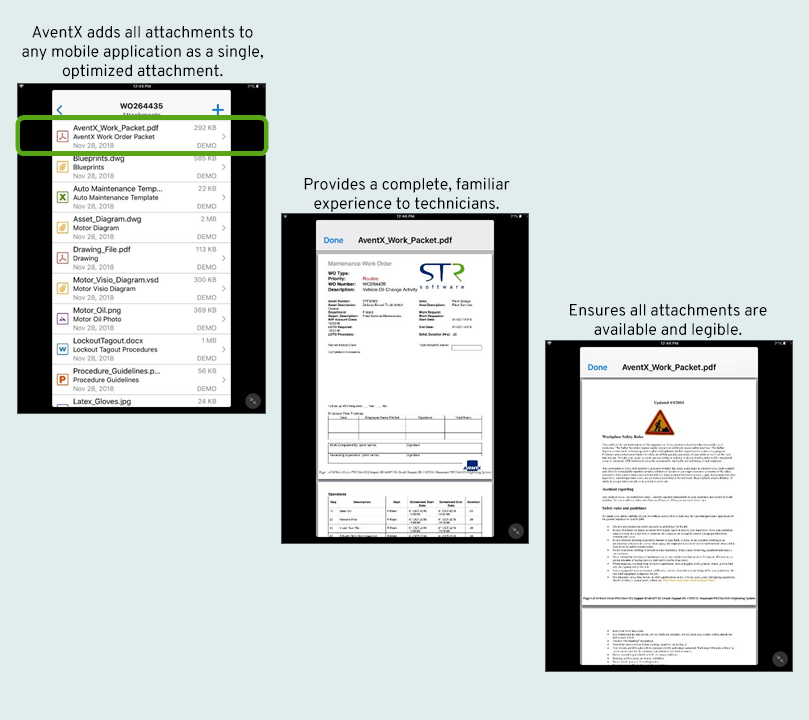
AventX for Oracle eAM | Attachment Gathering

Reason #2: Safety Checklists and Other Procedures Can’t Be Marked Up and Signed

Now that your maintenance technicians are getting all those crucial documents through your mobile app or device, they have the information they need to tackle their assigned work. More importantly, the files are in an easy to consume format—PDFs that can be navigated through, zoomed in on, and quickly reviewed.

You can check off the “Management Leadership” and “Worker Participation” line items on your Safety and Health Program.

But are your technicians participating? You’ve provided them the files, but as of right now, the only thing they can do is look at them.

If all your technicians in the field can do is view the files, your leadership and management team may be missing the mark on possibly the two most critical components of OSHA’s Best Practices:

  • Identify and assess hazards and dangerous situations; and
  • Prevent and control these situations before they create problems.

Without the ability to “use” attached forms—checklists, signature approvals, etc.—the whole Safety and Health Program begins to unravel.

Leaders and managers lose control of the procedures that are in place to ensure safety. Workers can ignore these critical documents because there is no system in place to monitor how the documentation is being used.

Quick Fix: Ensure Your Critical Work Order Attachments Can Be Interacted with on a Mobile Device

So, your next step is to ensure that these mobile-ready files are interactive, making sure that they can be annotated, marked up, signed, stamped, and more.

Manually created PDFs can be set up to be saved with interactive elements, like checkboxes and signature panes. When saved back into Oracle eAM, these files can then be accessed from the database by some mobile applications.

AventX for Oracle eAM’s Digital Print feature extends AventX’s attachment-gathering capabilities by saving a copy of the complete work order packet back to the Work Order header.

This provides a complete work order with all its attachments available to any mobile maintenance application that can view the work order header. More importantly, the AventX solution maintains any interactive functionality of PDF attachments.

By providing technicians with the tools to interact with your work orders and, more importantly, the safety documentation that comes along with them, your organization has the tools to maintain a safe and productive working environment.
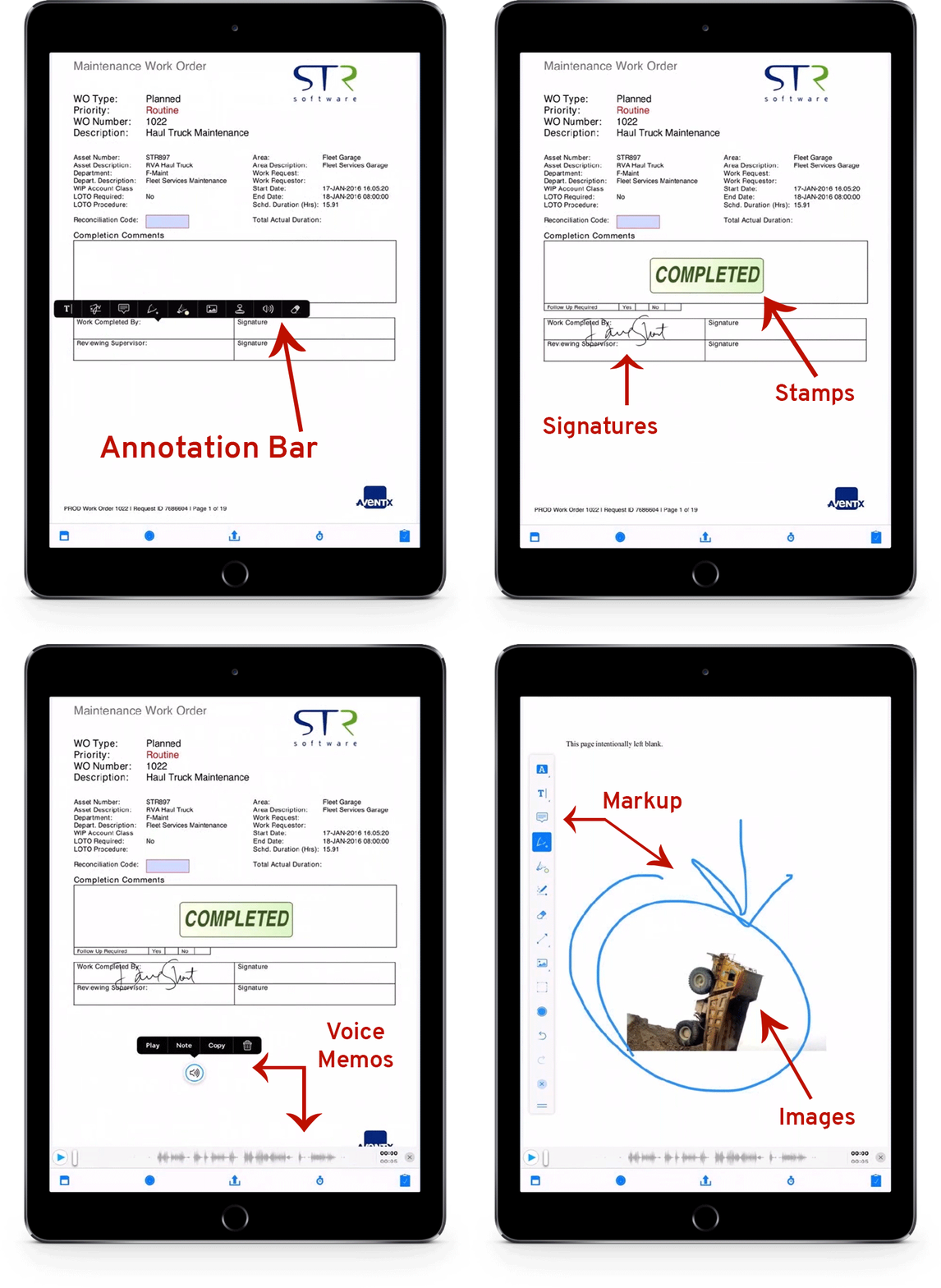
Mobile Maintenance Work Order Annotation & Mark Up

Reason #3: Single Source of Truth for Program Evaluation and Auditing

At this point, we’ve reviewed the importance of 1) providing all the safety (and other) documents via a mobile application and 2) the ability of technicians to interact with those documents.

But you may still be missing out another critical Best Practice that may leave you open to potential OSHA compliance issues.

That is the Program Evaluation & Improvement component.

For organizations running a successful Safety and Health Program, there should be a single source of truth for evaluating the use of safety checklists and documentation. Leaders and managers need the ability to monitor the use of these all-important forms periodically.

Moreover, you may, at some point, need to show these documents to officials should you ever undergo an OSHA audit.

While the right file type (PDF) and annotation capabilities of many mobile maintenance applications provide much of the needed infrastructure to be successful, they often can’t distribute these necessary documents, once completed, to a final destination. This is especially true for organizations running Oracle eAM with a third-party application, which often don’t send completed documents back to the eAM module.

These files need a final resting place for leaders and managers to track progress and discover areas for growth.

Quick Fix: Ensure Marked and Signed Documents are Saved to a Single Location

Ensuring that your mobile application can save completed work orders and their safety documents back to a central location is critical.

Leaders must have the ability to monitor employee usage and manage to deficiencies. For many organizations, this single source of truth is Oracle eAM itself.

If your mobile application cannot save the document back to Oracle or to an external library, like SharePoint, you may be setting yourself up for disaster.

To supplement third-party applications, the Digital Print feature of AventX can make these critical files accessible from your networked libraries for both initial usage and for archival or auditing purposes. Or, the AventX Mobile for Oracle eAM application easily saves these documents back to the work order in Oracle eAM.
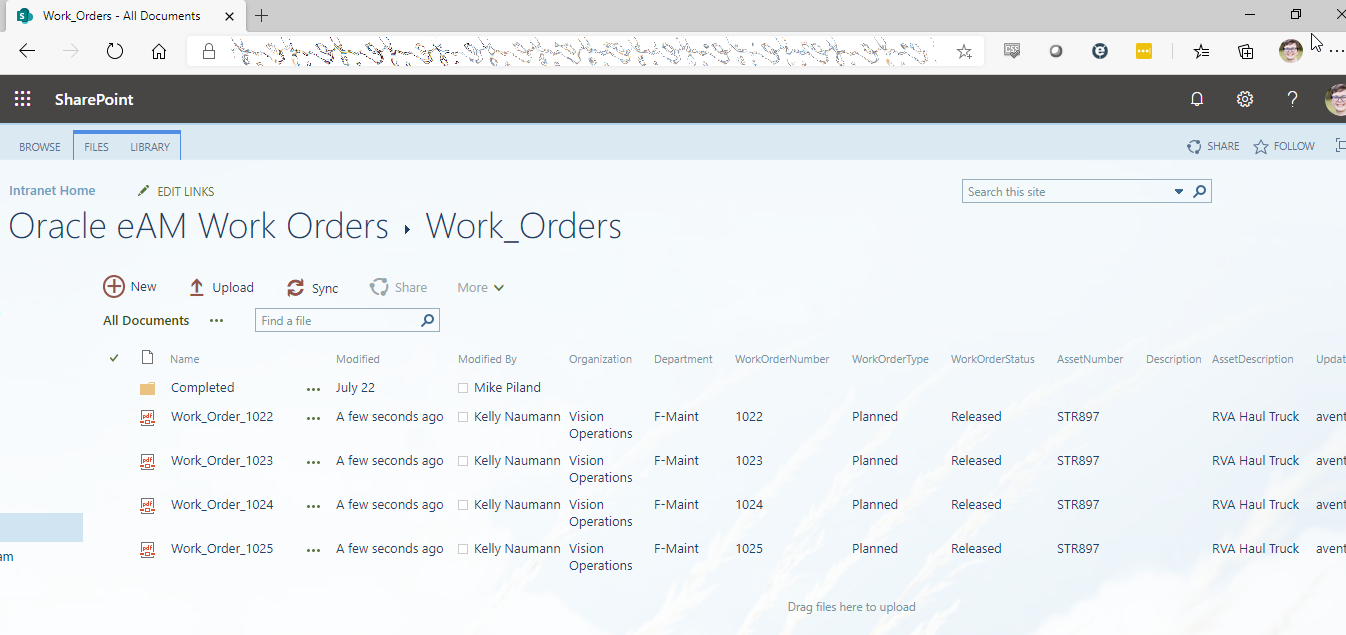
AventX Digital Print | Archive to SharePoint

In Review

Mobile applications are undoubtedly the future of the maintenance industry. However, there are three key areas that may present challenges for organizations, especially when it comes to OSHA Best Practices and compliance.

  1. Missing or incomplete information making it to the field
  2. Critical safety sheets and checklists that are not interactive
  3. No mechanism available for program evaluation and auditing

For organizations to execute effective Safety and Health Programs in support of OSHA’s mission, they must review the available Safety and Health Program Best Practices and the Safety and Health Program Audit Tool.

Organizations must also understand and document the role of maintenance applications as they relate to established safety programs. If your maintenance application is deficient in even one of the three areas above, you may be opening the company to violations and fines.
White Paper: Improving Asset Maintenance Productivity, Safety, and Reliability | Oracle eAM

White Paper

Improving Asset Maintenance Productivity, Safety, and Reliability

For maintenance organizations running Oracle E-Business Suite Enterprise Asset Maintenance (eAM), a functionality gap that users commonly recognize is the inability to print work orders with their associated attachments. In asset-intensive industries, maintenance departments bear the burden of ensuring the reliability of aging equipment. The key to keeping up with asset reliability is scheduling preventative and corrective maintenance, and providing maintenance crews with the documentation they need to be safe and successful at their jobs.

Plus, learn about AventX's Digital Print feature in the Spring 2020 Release Summary.
Contact us for a demonstration »

See What AventX Can Do for Your ERP

Automate how your Oracle, JD Edwards, or SAP system emails, faxes, prints, and tracks business documents. Reach out and we’ll show you how it works with your setup.

Rollup of Product Updates: v26.3

AventX 26.3 tracks every document from Oracle EBS, Oracle Cloud, and SAP in one place, with one delivery per customer and offline-ready AventX Mobile.

German E-Invoicing Starts January 1: What JD Edwards Teams Need to Do Now

JD Edwards can already produce your invoice and its structured data. Germany’s mandate needs them as one file. Here’s how to close that gap before the deadline.

Rollup of Product Updates: v26.1 & v26.2

Edit the Oracle EBS printer registry safely…no DBA access required. Automated, audited document delivery configuration for Oracle EBS teams.

AventX—Built on 40 Years. Designed for What’s Next.

For the past forty years, we've been working on a big business challenge. Document Delivery. In that time, STR Software has helped Oracle EBS, Oracle eAM, JD Edwards, SAP, and many more teams get the right documents to the right place—reliably, accurately, and on...

Stop the Administrative Shuffle: Closing the Gap Between Oracle EBS Contracts and Docusign

Discover how AventX integrates Oracle EBS Contracts with Docusign to automate attachment gathering, field placement, and link-back archiving.

How Oracle EBS Organizations Secure SharePoint Access While Moving Attachments Out of the Database

Oracle EBS teams need to move attachments to SharePoint without losing control over access. This use case shows how organizations align Oracle EBS user logic with Entra ID group governance to improve security, performance, and audit readiness.

Rollup of Product Updates [Fall, v25.4]

Improve security oversight, accelerate enterprise printing, and expand API driven integrations across Oracle EBS and eAM.

What’s New in AventX Mobile for Oracle eAM v25.3

Discover what’s new in AventX Mobile for Oracle eAM v25.3. Android support, offline enhancements, compliance controls, and faster mobile work order execution for enterprise maintenance teams.

STR Software at Quest’s Oracle Cloud Summit – Virtual!

We’re excited to announce that STR Software will be presenting at the upcoming Oracle Cloud Summit – Virtual!, hosted by Quest Oracle Community—a value-packed event delivering practical, how-to learning for Oracle Cloud Applications users. If your team is looking for...

Rollup of Product Updates [Summer 2025; v25.3]

AventX 25.3.x boosts enterprise document delivery with smarter email validation, expanded JD Edwards + Oracle compatibility, and powerful new eAM mobile and EBS API features to streamline workflows from the server room to the shop floor.

Printing Without Pain: How AventX Simplifies EBS Print Setup in OCI

When Oracle EBS moves to Oracle Cloud Infrastructure (OCI), printing becomes one of the most painful challenges. Here’s how AventX solves it.

Rollup of Product Updates [Spring 2025; v25.2]

Streamline your Oracle workflow with AventX. Get dynamic stamping, automated scheduling, and granular migration control for maximum efficiency.

Don’t Miss STR Software at Ascend 2025!

Discover how to conquer document delivery chaos in your Oracle Cloud environment at Booth #425 and learn invaluable strategies in our “How to Train Your Dragon” speaking session. Plus, a fiery giveaway awaits!

Global Steel Producer Achieves Dramatic Oracle Database Reduction through AventX A2A Attachment Migration

AventX A2A Migrates Attachments to SharePoint, Saving Hundreds of GBs and Improving Performance.

Share This