
I received a comment from Kris regarding a post on How to Burst and Deliver Documents From BIP Enterprise that said:
Thanks for your example. I managed to get this to work but as my data is based on 2 datasets I miss part of my data on the report. Only data that is in the dataset on which is split is shown.
hmm… I believe what Kris is referring to is that he has 2 Data Sources for his data, likely 2 or more plain SQL Queries that in the end create a nice looking report by setting BIP up to “Concatenate the SQL Data Sources”. However, when he goes to burst the data, some data is missing from the output as he restricted to selecting split/delivery information from the Concatenated SQL. Meaning, if you choose to split by an element in Query 1, all of the data in Query 2 will not be available because it’s not in the same XML Element Grouping as the Split By element (and vice versa).
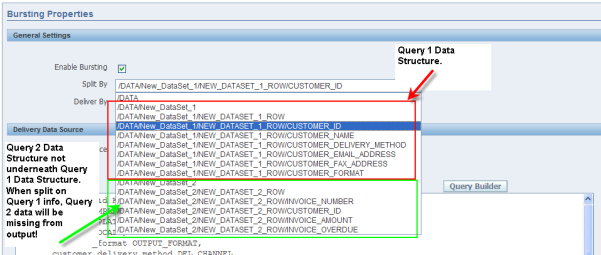
Believing that Data Templates allow you to merge multiple Data Sources into 1 Data Model with the appropriate grouping, I took a look at the BI Pubisher Enterprise Documentation. I was surprised to find that it appeared not to be possible (or I was looking in the wrong spot)! You can define a default data source for the entire report, but it did not look like you could define a data source PER query in the Data Template.
Not accepting defeat, I started Googling and came across Tim Dexter’s post regarding Multi-Database Data Templates.
Using this information and my original Overdue Invoice example, I setup 2 database schemas in separate databases (i.e. 2 Data Sources) and created my Customers table in one database and my Invoices table in another database. I then created a Data Template that would query from both and merge the results!
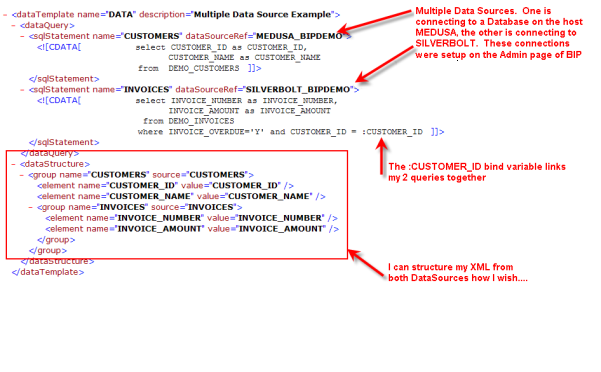
As you can see, I’m connecting to 2 different data sources (MEDUSA_BIPDEMO and SILVERBOLT_BIPDEMO – which are completely separate databases), querying for my data and then merging the queried data together to create the XML. The XML that I have created is not simply concatenated, it’s grouped so that I have CUSTOMERS at my top level and INVOICES underneath.
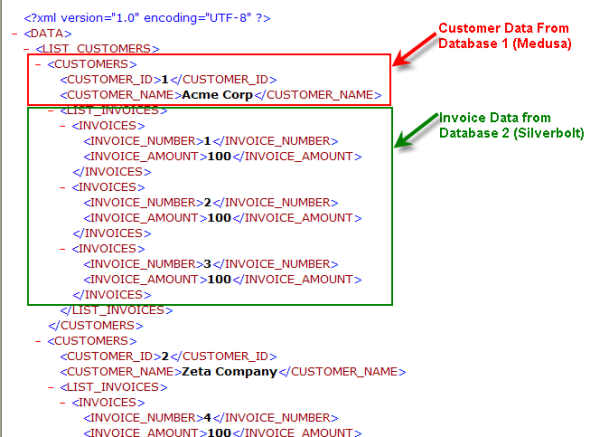
Now, as far as my report and bursting is concerned, I only have 1 Data Source!
One thing of note, when you are creating your bursting query, you must have all of your delivery information in 1 database, you cannot span multiple data sources here. In general, I believe this is OK. It’s doubtful (but not impossible) that you would have contact data strewn across multiple databases, but who knows….
So hopefully this can help Kris, if I completely missed the mark, then I apologize, at the very least I learned something new!

![Rollup of Product Updates [Fall, v25.4]](https://www.strsoftware.com/wp-content/uploads/2023/02/Feature_Image_ProductUpdate_Wave-510x382.png)