

From my previous post regarding Bursting from Multiple Data Sources I had assumed that Kris’ comment meant that he had data in separate databases. After some discussion with him, I learned that the data was in the same database and he was using multiple SQL queries to get the information.
However, the problem was the same as the SQL queries return the data and BIP groups it accordingly. Unfortunately, the data was returned in such a way that the XML that was created was not formed to burst correctly. Data Templates would have worked for him, however he took a different route. One I definitely had not thought about.
Instead of using Data Templates, Kris condensed his multiple queries to a single SQL query that employed the use of Cursor Expressions to ensure that the data was returned in a way that would produce XML with the correct grouping of elements.
Let’s take a look at an example using the standard data for the Overdue Invoice Report I have been using for all of my posts.
For my example, I have 2 tables.
demo_customers has all of the information about my customers.
demo_invoices has all of the information about my customer’s invoices.
I want to create a report that shows overdue invoices by customer using a single query and without using Data Templates.
To do this I would use the following query using cursor expressions:
select customer_id,

customer_name,

cursor (

select invoice_number, invoice_amount

from demo_invoices i

where i.invoice_overdue = 'Y' and i.customer_id = c.customer_id) invoices

from demo_customers c
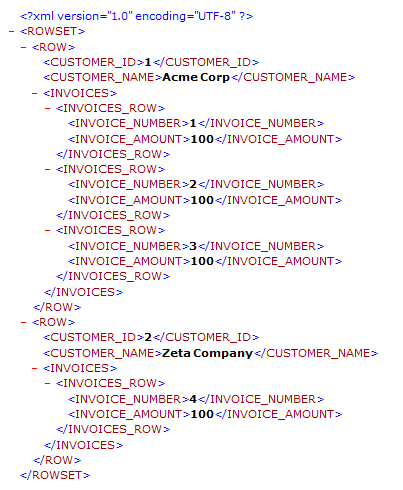
This query will output the following XML, which as you can see is grouped appropriately (top level of customers with child nodes for each customer’s invoices) to ensure that I can create a template with relative ease as well as burst.
Thanks for the information Kris, I’m sure it will help others!



![Rollup of Product Updates [Fall, v25.4]](https://www.strsoftware.com/wp-content/uploads/2023/02/Feature_Image_ProductUpdate_Wave-510x382.png)